Manual deployments are one of the most common sources of production errors in Laravel projects. A forgotten migration step, an untested code path, or a local environment variable quickly cause problems. A CI/CD pipeline replaces this manual work with automation: tests run independently, code quality is ensured, deployments occur reproducibly.
For teams operating professional Laravel development, a well-structured CI/CD pipeline is no longer an optional extra today, but the foundation on which stable software is built.
What is Laravel CI/CD and what distinguishes it from manual workflows?
CI/CD stands for Continuous Integration and Continuous Deployment. Together, both concepts automate the entire path from code commit to the running application in production. In the Laravel context, this means: every change a developer commits to the repository automatically goes through a defined sequence of verification steps before being deployed.
What does Continuous Integration mean for Laravel teams?
Continuous Integration means that code changes from multiple developers are continuously integrated into a shared branch and automatically checked in the process. No code lands in the main branch without first having gone through a defined quality check.
For Laravel teams, this specifically means: every pull request automatically triggers Laravel testing, static code analysis, and linting. If a test fails, the pipeline itself blocks the merge, not just the manual code review. This reduces dependence on human attention and makes quality assurance structurally reliable. Agile teams benefit from this because it makes iterative changes practical in the first place.
What does Continuous Deployment mean and when is it sensible?
Continuous Deployment goes one step further. Not only quality checking, but also the deployment itself occurs automatically. Every change that successfully passes through all pipeline stages automatically lands on the target server – without manual intervention.
Automation may sound risky. In practice, the opposite is the case: because changes are small and verified, the risk during deployment decreases significantly compared to large, infrequent manual releases. Studies consistently show that teams with high deployment frequency simultaneously achieve lower error rates in production. This is not an exception, but a direct consequence of the pipeline structure.
| Characteristic | Manual Workflow | CI/CD Pipeline |
|---|---|---|
| Deployment Trigger | Human, manual, after coordination | Automatic after passed tests |
| Error Rate | High, dependent on attention | Low, structurally verified |
| Deployment Frequency | Rare, bundled, risky | Frequent, small, controlled |
| Traceability | Weak, dependent on documentation | Complete, every step logged |
| Team Overhead | High through coordination and approvals | Low, pipeline runs autonomously |
| Rollback on Error | Elaborate, manual | Defined, reproducible |
Which error classes does automated Laravel testing prevent?
Automated Laravel testing in the CI/CD pipeline structurally prevents three error classes that are hardly reliably catchable manually.
Regressions occur when a change in one place breaks functionality in another place. This effect is almost impossible to detect manually in complex codebases without a complete test suite. Integration errors, in turn, show up when components work individually – not together. Feature tests and integration tests in the pipeline systematically cover this class. Environment discrepancies arise when code works locally but not on the server. The pipeline runs here in a defined, production-like environment and not on the developer's laptop.
A production error in practice costs more than just the pure fix time: debugging, communication in the team, the actual hotfix deployment, and blocked feature work quickly add up to several hours of effort per incident. A well-set-up CI/CD pipeline prevents a relevant portion of these error classes before the merge and thereby amortizes itself in most projects within a few months.
Which components belong in a professional Laravel CI/CD pipeline?
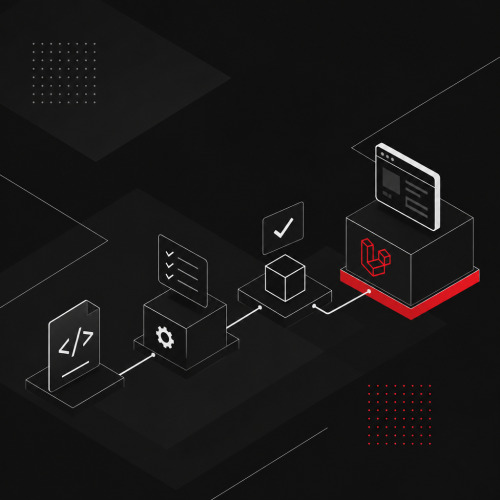
A complete Laravel CI/CD pipeline consists of several sequential stages. Each stage has a clearly defined task and blocks all following stages if it fails.
| Component | Purpose | Recommended Tool | Mandatory? |
|---|---|---|---|
| Dependency Installation | Install Composer and NPM packages reproducibly | Composer, npm/yarn | ✅ Mandatory |
| Linting / Code Style | Ensure consistent formatting | PHP CS Fixer, Laravel Pint | ✅ Mandatory |
| Static Analysis | Detect type errors and structural problems | PHPStan / Larastan | ✅ Mandatory |
| Unit Tests | Check isolated components | PHPUnit / Pest | ✅ Mandatory |
| Feature Tests | Check complete processes against the database | PHPUnit / Pest | ✅ Mandatory |
| Security Audit | Check for known security vulnerabilities in dependencies | composer audit |
⚠️ Recommended |
| Build / Asset Compilation | Compile frontend assets | Vite | ⚠️ Project-dependent |
| Deployment (Staging) | Automatically deploy to staging | Envoyer, Forge, custom script | ✅ Mandatory |
| Deployment (Production) | Automatic or manually released | Envoyer, Forge | ✅ Mandatory |
Why is linting not an optional extra, but mandatory?
Linting is often treated as "nice to have". This is a misunderstanding. Consistent code style has nothing to do with aesthetics, but with readability, maintainability, and team capability.
In a team that works without automated linting, over time a codebase emerges where each section looks different. New developers have to get used to different styles, formatting discussions burden code reviews, and changes in branches lead to merge conflicts that are purely stylistic in nature.
PHP CS Fixer and Laravel Pint, the official Laravel linting tool since Laravel 9, completely solve this problem. Both run in the pipeline and not in an optional pre-commit hook that every developer can ignore locally. Clear code standards thus reduce the long-term development costs of a project.
GitHub Actions Laravel: Why it has become the standard
GitHub Actions has established itself in recent years as the de facto standard for CI/CD in Laravel projects. There are several concrete reasons for this.
Workflow files are located directly in the repository itself, under .github/workflows/. A separate CI tool or external configuration is not necessary; everything is versioned and thus maintainable together with the code. For public repositories, usage is unlimited and free; for private repositories, the free tier is sufficient for most teams. In addition, there is an active Laravel community with numerous pre-built actions, example workflows, and resources specifically for Laravel, from PHPUnit integration to automated Forge deployment.
Which CI/CD platforms exist and why has GitHub Actions prevailed?
| Platform | Cost | Entry | Laravel Support | Community |
|---|---|---|---|---|
| GitHub Actions | Free (public) / affordable (private) | Very low | Excellent | Very large |
| GitLab CI | Free (self-hosted) / paid (SaaS) | Medium | Good | Large |
| Bitbucket Pipelines | Included in Atlassian package | Medium | Medium | Medium |
| CircleCI | Free tier limited | Higher | Good | Medium |
| Jenkins | Self-hosted, free | High | Individual | Large, outdated |
The choice ultimately depends on where the code resides. Teams that use GitHub as version control have the lowest effort with the highest community support with GitHub Actions.
How can CI/CD be smoothly introduced in a Laravel team?
The biggest hurdle when introducing CI/CD is rarely technical, but cultural in nature. Developers who have deployed manually for years initially experience a pipeline as a loss of control or bureaucratic barrier. Neither is accurate – the feeling, however, is.
The most important principle is not to introduce CI/CD all at once, but to proceed step by step. Iterative approaches work systematically better for technical changes than a big-bang approach and simultaneously preserve acceptance in the team.
A proven introduction proceeds in four phases. First, the team only automates tests: the pipeline runs but doesn't block merges yet, and developers get used to tests running after every push. In the second phase, failing tests block the merge into the main branch. This is the most important cultural step because code quality is thereby systematically secured. In the third phase, linting and static analysis are added: PHP CS Fixer and PHPStan run in the pipeline, gradually fixing existing violations and blocking new ones. Only in the fourth phase does automated deployment follow: staging is deployed automatically, production follows either fully automatically or with a manual trigger as a safety net.
This gradual introduction reduces resistance because each phase offers clear added value. A lived DevOps culture in the team additionally supports this change because it unites responsibility for operations and development.
Zero-Downtime Deployment with Laravel: How does that work?
Zero-downtime deployment means that a new version of the application is deployed without users experiencing an error message or interruption during deployment. In Laravel, we typically achieve this through a symbolic link: multiple release directories exist on the server, and a symlink always points to the current version. A new deployment creates a new directory, prepares it, and only then switches the symlink. The process takes milliseconds.
Tools like Laravel Envoyer fully implement this pattern and integrate directly with GitHub Actions. Our article on Continuous Deployment in Practice describes the complete deployment process in practice. Those who additionally combine the pipeline with modern approaches like agent-based software development can further reduce routine checks and place greater focus on architectural decisions.
Conclusion
A Laravel CI/CD pipeline is not a gimmick for large teams or complex projects. It is the structural answer to the problem that manual processes are error-prone.
Continuous Integration ensures that code quality is verified before it enters the main branch. Laravel testing makes regressions visible before they land in production. Linting keeps code maintainable. And Continuous Deployment makes releases a routine, low-risk process instead of a nervous event.
Would you like to set up a CI/CD pipeline for your Laravel project or professionalize an existing one? We'd be happy to discuss what makes sense in your specific setup. Schedule a free initial consultation, non-binding and directly related to your project.