
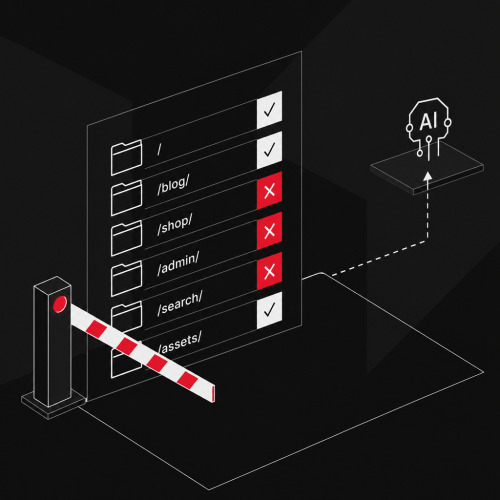

A robots.txt is written in five minutes, a wrong line removes entire sections from search. The file controls crawling, not indexing. This guide shows syntax, practical recipes and the most common mistakes, cleanly placed within technical SEO.
Hardly any file is so small and causes so much damage. In projects, we repeatedly encounter the same story: A single line in the robots.txt costs visibility over months without anyone noticing the cause. The topic seems trivial, and that's precisely where the danger lies. We still see serious errors today that push entire websites back in rankings, often with teams that otherwise work cleanly.
The knowledge requirement is real, and the effort is worthwhile. Those who master the robots.txt avoid the expensive accidents and simultaneously gain real control: crawl capacity lands where it counts, sensitive areas remain cleanly regulated, and even in tricky constellations of parameters, filters and AI crawlers, you maintain control. The rest is craftsmanship, and that's exactly what the following sections demonstrate.
What the robots.txt controls, and what it doesn't
The robots.txt is a simple text file in the root directory of a website. It is the first address that a search engine retrieves when visiting, and it follows the Robots Exclusion Protocol, which has been officially standardized as RFC 9309 since 2022. Through a few lines, you determine which areas a crawler may retrieve and which not.
The most important sentence first, because most configurations fail on it: The robots.txt regulates access, not visibility in the index. It decides on crawling, i.e. whether a search engine calls up a URL at all. Whether this URL is subsequently included in the search index is a separate, subsequent step.
The difference is not splitting hairs. A URL blocked by Disallow can still appear in the results if other pages link to it. The search engine then knows the address, but not the content, and shows the hit without a description. If you want to permanently remove a page from the index, you need Noindex for that, not the robots.txt. How both instruments work together and when which one applies is deepened in the article Controlling indexing correctly.
Where the robots.txt must be located
The file belongs exactly in the root directory and is always accessible under https://your-domain.com/robots.txt. No crawler looks for it in a subfolder. The filename is written in lowercase, the format is plain text in UTF-8, and Google processes up to 500 KiB per file. Everything above that is truncated.
The scope is decisive: A robots.txt only applies to exactly one protocol, one host and one port. Each subdomain, each change from HTTP to HTTPS and each different port needs its own file. shop.your-domain.com and www.your-domain.com are two separate worlds from the file's perspective. Exactly one valid robots.txt exists per host.
The following overview shows which address is responsible for which area:
| robots.txt under | applies to | does not apply to |
|---|---|---|
https://example.com/robots.txt |
https://example.com/ and all paths below it |
Subdomains, HTTP version, other ports |
https://www.example.com/robots.txt |
https://www.example.com/ |
https://example.com/ without www |
https://example.com/folder/robots.txt |
nothing, is ignored | Crawlers only read the file in the root directory |
https://example.com:8181/robots.txt |
only port 8181 | standard port 443 |
Source: Google Search Central, robots.txt specification (accessed August 2026).
The structure: Directives and control characters
A robots.txt consists of groups. Each group begins with a User-agent line and contains the rules for this crawler below it. Search engines support four instructions at their core:
User-agent: names the addressed crawler,*stands for all.Disallow: blocks a path for crawling.Allow: releases a path again, even within a blocked directory.Sitemap: references the XML sitemap.
Comments begin with #, which the crawler ignores until the end of the line. Two older instructions are worth mentioning because they still often appear: crawl-delay is ignored by Google (Bing and some others still respect it), and a noindex in the robots.txt was officially shut down by Google in 2019. It no longer works.
An empty Disallow releases everything
A common misunderstanding concerns the empty instruction. Disallow: without a path blocks nothing, it releases the entire website. Functionally, this is identical to not storing any rules at all or providing an empty file. So if you want to allow everything, write:
User-agent: *
Disallow:
The exact opposite, the complete block for all crawlers, differs only by a slash:
User-agent: *
Disallow: /
Combining Disallow and Allow
It becomes interesting when both instructions come together. You block an entire directory but release a part of it:
User-agent: *
Disallow: /internal/
Allow: /internal/public/
For this to work reliably, you need to know the precedence. In case of conflicting rules, the longest, most specific path wins. /internal/public/ is longer than /internal/ and prevails, so this subfolder remains crawlable. If two rules are exactly the same length, the least restrictive wins, i.e. Allow. This logic allows fine exceptions without you having to list every single URL.
Control characters: Asterisk and Dollar
For patterns, the robots.txt knows exactly two wildcards, and this is probably the most common source of error: It's real pattern matching, not regular regex.
*stands for zero or more arbitrary characters.$marks the end of the URL.
This allows patterns to be captured precisely. /*.pdf$ matches every URL that ends with .pdf. /$ matches only the homepage. A path without $ always acts as a prefix: /fish blocks /fish, /fish.html and /fishheads equally.
Paths are relative, the sitemap is not
Allow and Disallow values are always relative paths and begin with a slash. They refer to the host under which the file is located; a complete domain does not belong here. Exactly the opposite with the sitemap: The Sitemap reference must be an absolute, complete URL. The reason lies in responsibility. A sitemap can be located on a different host than the robots.txt, so the crawler must learn the exact address including protocol and domain.
A second point that produces errors in practice: Paths respect upper and lower case. /Folder/ and /folder/ are two different targets.
The notation also determines how far a rule reaches. These four variants work differently:
| Instruction | Effect |
|---|---|
Disallow: /folder/ |
blocks the directory and everything below it, but not /folder as a file |
Disallow: /folder |
blocks everything that begins with /folder, so also /folder.html or /folder-old/ |
Disallow: /folder.html |
blocks exactly this file (and everything that begins with this character sequence) |
Disallow: folder/ |
invalid because the leading slash is missing, the line is ignored |
Source: Google Search Central, robots.txt specification (accessed August 2026).
Targeting User-Agents specifically
Through the User-agent line, you decide for whom a rule group applies. A crawler first searches the file for the group that exactly matches its name and only follows this one. The most specific group wins, the order in the file doesn't matter. If a crawler finds a group for Googlebot-News, it completely ignores the general * group.
For most websites, a single * group is sufficient. Distinguishing by crawlers is only worthwhile when a specific bot should be treated differently than the rest. These names are most frequently encountered in practice:
- Googlebot: the main crawler for Google search. It covers both the desktop and smartphone versions.
- Googlebot-Image: Google's image crawler, useful if you want to keep images out of image search but not the rest.
- Bingbot: Microsoft's crawler for Bing, which simultaneously feeds the search in many AI assistants.
- AdsBot-Google: checks the quality of Google Ads landing pages. A special feature: It does not follow the
*group but must be addressed by name.
The practical benefit of differentiation: You can lock out a resource-hungry or unwanted bot without restricting the search engines that are valuable to you. A typical pattern is to allow all and only block a single crawler:
User-agent: Storebot-Google
Disallow: /

User-agent: *
Allow: /
However, this doesn't guarantee that a bot follows your specifications. The robots.txt is a request, not a technical block. Reputable search engines like Google and Bing follow it reliably, scrapers and malicious bots ignore it. If you really need to lock down an area, work with an access block at server level, not with a Disallow.
Typical use cases with examples
In most projects, the robots.txt performs a handful of recurring tasks. The following recipes cover the majority of them.
These pages usually don't belong in crawling
The block is sensible for areas that have no value for search and only cost crawl capacity. This typically includes:
- internal search result pages that endlessly create new URLs
- shopping cart, checkout and the thank-you page after a purchase or download
- login, account and administration areas
- filter and sort URLs that show the same content in many variants
A basic framework for this looks like this:
User-agent: *
Disallow: /search/
Disallow: /cart/
Disallow: /checkout/
Disallow: /my-account/
An important caveat: For pages that are already in the index and should disappear from there, the robots.txt is the wrong tool (more on this in the section on limitations). For purely reserving crawl capacity, however, it is exactly right.
Excluding file types
Through the $ pattern, you block entire file extensions. Practical, for example, for internal PDF exports or spreadsheets that should not appear in search:
User-agent: *
Disallow: /*.pdf$
Disallow: /*.xls$
Removing parameters and parameter chains from crawling
Parameter URLs are the most common reason for wasted crawl budget on large websites. You control them via the asterisk. You block all URLs with a question mark comprehensively like this:
User-agent: *
Disallow: /*?
You capture a single parameter more specifically, and thanks to the asterisk, the rule also applies in the middle of a parameter chain like ?color=red&sort=price:
User-agent: *
Disallow: /*?sort=
Disallow: /*?sessionid=
There's a dependency lurking here that is easily overlooked: Whoever blocks a parameter URL via robots.txt simultaneously prevents the search engine from reading a Canonical or Noindex on this URL at all. For bundling duplicates, the Canonical tag is therefore the appropriate means; the robots.txt is only suitable for stopping real crawl waste.
Never block CSS and JavaScript
A relic from old SEO times that still appears: blocking CSS and JavaScript directories. Do not block these resources. Modern search engines render pages like a browser and need the stylesheet and scripts for this. If access is missing, the crawler sees a broken page and rates it accordingly worse. What used to be considered cleanup now causes direct damage.
Entering the XML sitemap
At the end of the file, you reference your XML sitemap so that search engines can quickly find all important URLs. Multiple entries are allowed, such as a sitemap index file plus specialized sitemaps. Each entry is listed as a complete URL and is independent of the User-agent groups:
Sitemap: https://www.your-domain.com/sitemap.xml
Sitemap: https://www.your-domain.com/sitemap-images.xml
What the robots.txt cannot achieve
Three limitations are so important that they deserve their own section, because ignoring them becomes expensive.
First, the robots.txt does not protect confidential content. The file is publicly available under /robots.txt and must be located there; anyone can read it. A Disallow also directly points the way to areas you actually wanted to hide. Confidential content belongs behind authentication, never in a Disallow. Hiding the file itself makes no sense, because then the desired crawlers can no longer find their instructions.
Second, the robots.txt does not remove anything from the index. It keeps crawlers away, but an already indexed or linked URL can still remain in the results, then without a snippet. For clean removal, the page must remain crawlable and carry a Noindex. If you additionally block it via robots.txt, the search engine never reads the Noindex and achieves the exact opposite.
Third, there is no functioning noindex in the robots.txt. This instruction has not been evaluated by Google since 2019. Index control runs via the Meta-Robots tag or the X-Robots tag in the HTTP header, not via this file.
Controlling AI crawlers specifically
Since generative AI systems and search engine AI responses (AI Overviews) have become a growing part of search, the robots.txt has become a tool to regulate these systems' access. Many of the major providers respect the file and have their own named crawlers. The distinction between two tasks is important: One crawler collects data for model training, another retrieves content live to answer a specific user question. Both can be treated separately.
| User-Agent | Provider | Purpose |
|---|---|---|
GPTBot |
OpenAI | Collecting training data |
OAI-SearchBot |
OpenAI | Live retrieval for search answers |
ClaudeBot |
Anthropic | Collecting training data |
PerplexityBot |
Perplexity | Indexing for answer search |
Google-Extended |
AI training, without influence on Google ranking | |
CCBot |
Common Crawl | open dataset, often training basis for third parties |
Source: Information from respective providers about their crawlers (accessed August 2026).
If you want to keep your Google ranking but don't want to flow into AI training, specifically block the training crawlers and leave Googlebot untouched:
User-agent: GPTBot
Disallow: /

User-agent: Google-Extended
Disallow: /

User-agent: *
Disallow:
An honest limitation belongs here: Some bots don't follow the file. The crawler Bytespider from ByteDance, for example, is known for ignoring robots.txt specifications. Such accesses are only stopped by a block at server level, for example via firewall or a service like Cloudflare.
Testing and rolling out robots.txt
Before a new file goes live, check it on two levels. First call up https://your-domain.com/robots.txt in a private browser window and verify that the file is delivered with status 200 and shows the expected content. The HTTP status is more important here than it seems: If the file responds with a 5xx error, Google temporarily pauses crawling of the entire website. A 4xx error, however, is treated as if there were no restrictions.
For content verification, use the robots.txt report in Google Search Console. It shows the most recently retrieved version, reports syntax errors and can be used to test individual URLs against the rules. After a change, Google doesn't respond immediately: The robots.txt is cached for up to 24 hours. If you want to be faster, trigger an immediate update in the same report via the function for recrawling.
Additionally, a log file analysis shows which URLs the crawlers actually retrieve. This way you can see afterwards whether your blocks work as planned.
Frequently asked questions about robots.txt
Does the robots.txt prevent a page from appearing on Google?
No. The file only controls crawling. A blocked URL can still land in the index if other pages link to it, but then without a description. To reliably keep a page out of the index, use a Noindex and leave the page crawlable for this purpose.
Does a robots.txt also apply to subdomains?
No. Each subdomain needs its own robots.txt. Also, a change of protocol from HTTP to HTTPS or a different port requires its own file in each case, because it always only applies to exactly one combination of host, protocol and port.
May I block CSS and JavaScript files?
No. Search engines render pages and need stylesheets and scripts for this. If access is blocked, the page can be evaluated incorrectly. Blocking these resources is an outdated error.
How do I get an already indexed page back out of the index?
Set a Noindex in the Meta-Robots tag or in the X-Robots tag and ensure that the page remains crawlable so that the search engine reads the signal. The URL must not additionally be blocked in the robots.txt for this purpose. The removal can additionally be accelerated via Google Search Console.
Do all crawlers follow the robots.txt?
No. The file is an instruction, not a technical block. Reputable search engines and most major AI providers follow it; scrapers and individual bots ignore it. For real access protection, you need a server-side block or authentication.
Sources
- Google Search Central, documentation on robots.txt: Creation, specification, useful rules and updating (accessed August 2026).
- Robots Exclusion Protocol, RFC 9309 (2022).
- Information from respective providers about their AI crawlers: OpenAI, Anthropic, Perplexity, Google, Common Crawl (accessed August 2026).
Related topics
- Controlling indexing correctly: which pages Google sees
- The definition in the lexicon: robots.txt
- The process behind it: crawling
- Why large websites must direct crawl budget